THANK YOU FOR SUBSCRIBING
× 
Enterprise Security Mag Weekly Brief
Be first to read the latest tech news, Industry Leader's Insights, and CIO interviews of medium and large enterprises exclusively from Enterprise Security Mag

Vault Password Manager: Alpha Serve's Password Solution for Jira, Now Live on the Atlassian Marketplace
Enterprise Security Magazine | Friday, June 02, 2023
Alpha Serve, an Atlassian Platinum Marketplace Partner, is excited to introduce a groundbreaking app on the Atlassian Marketplace: Vault Password Manager, an exceptional password manager specifically tailored for Jira users.
 This innovative password manager aims to become the top Jira password manager app by offering a comprehensive suite of features that help users keep their passwords and sensitive information safe and secure. The use of the Forge platform enhances Vault's security even further, as it is designed with robust security measures like sandboxing and secure authentication, ensuring a high level of trust and protection for users' data and sensitive information.
Stay ahead of the industry with exclusive feature stories on the top companies, expert insights and the latest news delivered straight to your inbox. Subscribe today.
This article will delve into what makes Vault Password Manager a pioneering password manager on the Atlassian Marketplace, explore how it functions, and discuss why it's quickly gaining recognition as one of the best password manager apps available.
Why Vault Password Manager for Jira
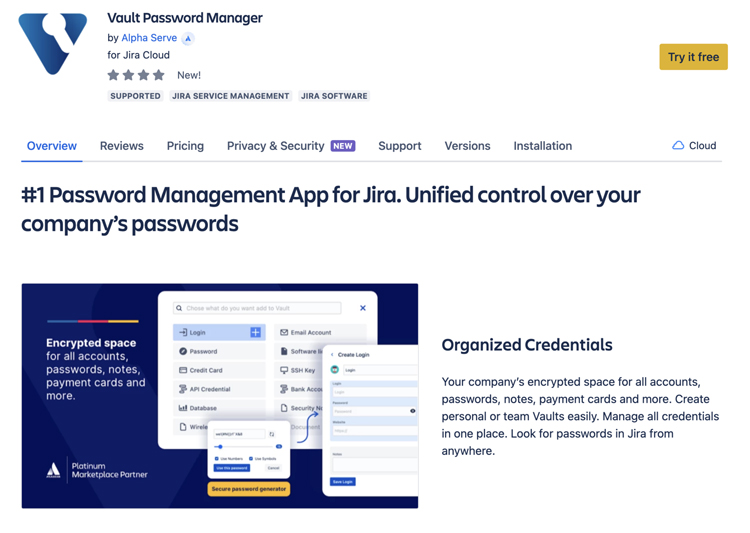
What is a password manager? It is a software tool created to securely store, manage, and share passwords and other sensitive data. Vault Password Manager is specifically designed for Jira users. It offers a top-notch solution for companies to enable their teams to safely store and handle confidential credentials within their everyday work tool, Jira. It provides an efficient way to keep sensitive information secure and share it between teams and departments while maintaining user convenience in the Jira environment.
Companies of all sizes can benefit from centralized administration, secure data sharing among employees, and quick, authorized access to Vaults from any Jira page, regardless of location. This allows for smooth and secure information exchange within an organization while ensuring control and access for approved personnel.
This Atlassian password manager offers numerous benefits that make it the best password manager for Jira:
Enhanced Security with Encrypted Storage and Additional Security Layer
All encrypted vaults are stored on external storage such as Amazon S3, Google Drive, OneDrive, or Dropbox. AES-256-bit encryption is implemented to ensure complete security. Additionally, basic Jira login security is in place to prevent unauthorized access.
Streamlined Collaboration and Secure Sharing within Jira
Vault Password Manager allows easy one-to-one and one-to-many credentials sharing inside Jira. It eliminates the need for insecure sending of passwords via email or messenger, ensuring maximum security.
Organized and Accessible Credentials
Vault Password Manager offers an encrypted space for all accounts, passwords, notes, payment cards, and more. Users can create personal or team vaults and manage all credentials in one place, ensuring maximum organization and easy access.
Cost-Effective and Scalable Solution
Unlike external password management services requiring separate subscriptions and user fees, Vault Password Manager offers optimal pricing based on team size. It makes it a cost-effective solution for businesses of all sizes, which scales with your company's growth.
 Vault Password Manager: Key Features
Knowing how to manage passwords is essential to ensure the security of your company's sensitive information. With Vault Password Manager, managing your passwords and other critical data is easy and convenient. Vault Password Manager comes equipped with a range of features, making it a highly effective and reliable solution for storing and managing passwords and all sensitive information within Jira. Explore the key features that make Vault Password Manager the ultimate choice for safeguarding your sensitive information within Jira.
1. Streamlined Password Management
Experience simplified storage and management of passwords and other types of sensitive data within Jira, safeguarding your company's vital information.
2. Flexible Data Storage Options
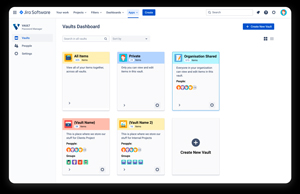
Vault Password Manager accommodates a vast array of data types, including passwords, logins, credit card details, secure notes, and software licenses. Tailor private or shared vaults to meet your specific needs.
3. Comprehensive Security Layers
A personal password and Jira login security shield each user account, while the built-in password generator facilitates the creation of strong, secure passwords.
4. Advanced Security Capabilities
Featuring multi-factor authentication and end-to-end encryption, Vault Password Manager stands out as one of the most secure password management solutions for Jira users.
5. Customizable Access Permissions
Effortlessly manage access permissions with Vault Password Manager by assigning specific permissions (view, edit, and manage) for the vaults you create.
6. Controlled Password Recovery
Self-recovery, accessible to users with a Recovery Key, provides an efficient and secure method for managing passwords. When self-recovery is not an option, Jira admins exercise sole authority over approving recovery requests, delivering an additional security measure.
7. Automatic Logout for Enhanced Protection
To enhance security further, Vault Password Manager automatically logs users out after a predetermined period of inactivity.
8. Limitless Vault Creation
Accommodate diverse storage needs by creating as many private or shared vaults as necessary.
Vault Password Manager offers a comprehensive and secure solution for managing passwords and other sensitive data within Jira. Its outstanding features, such as streamlined password management, flexible data storage options, and advanced security capabilities, make it an indispensable tool for Jira users who prioritize data protection and efficient password management.
Read the full story here: https://www.alphaservesp.com/blog/vault-password-manager-now-live-on-the-atlassian-marketplace
More in News
Digital identity protection has become a major priority as organizations manage more online users, connected services and sensitive information. Traditional password-based authentication is no longer enough to meet growing security needs. Many organizations are now using technologies that verify identity through unique biological characteristics, making access both more secure and more convenient. Growing demand for biometric identity security solutions reflects a wider move toward stronger authentication methods that improve security without making the user experience more difficult.
Which Innovations Improve Identity Verification Accuracy?
Biometric authentication continues to evolve through more advanced recognition methods. Facial recognition, fingerprint scanning and iris verification help organizations confirm identities with greater accuracy while reducing dependence on passwords or security questions. Multiple verification options also give users greater flexibility when accessing digital services.
Liveness detection has become an important part of modern biometric security. Instead of relying only on photos or recorded data, the technology confirms that a real person is present during authentication. An additional layer of protection helps reduce identity fraud and gives users greater confidence in the security of the system.
How Are Security Strategies Adapting to Modern Risks?
Privacy protection remains a top priority as biometric technologies become more common. Secure storage, encrypted processing and controlled access help keep sensitive biometric information protected throughout the authentication process. Strong privacy practices also help organizations meet regulatory requirements and build user trust.
Integration with existing business systems is making identity management more seamless. Authentication tools work with workforce platforms, customer portals and digital applications to provide secure access without interrupting daily operations. Connected systems also make it easier to manage user identities across different environments.
Continuous authentication is becoming an important security measure for protecting digital accounts. Rather than checking identity only during sign-in, the system keeps monitoring activity throughout the session. If unusual behavior is identified, it can take quick action to reduce risks and help keep accounts secure.
Growing adoption of biometric identity security solutions reflects the rising demand for secure and reliable digital authentication. By combining advanced verification methods, artificial intelligence and privacy-focused security practices, organizations can better protect user identities while making the authentication process faster and more convenient. ...Read more
Cyber security has become part of the dayto-day running of a business. Organisations rely on digital systems to serve customers, manage information and keep operations moving. When those systems are compromised, the effects can reach well beyond the IT department, disrupting services, exposing sensitive data and damaging customer confidence. Protecting a business means understanding these risks and making security part of how people work.
The threats are varied, and they do not always begin with a sophisticated attack. A convincing email, a stolen password or an outdated software application can give criminals a way into business systems. As organisations adopt cloud services, support remote working and rely on external suppliers, keeping track of potential weaknesses becomes more difficult.
Understanding Where the Risks Lie
Cyber security covers the systems, information and processes organisations use to prevent unauthorised access, data theft and disruption. Phishing, ransomware and attacks on software vulnerabilities remain important concerns, but the weaknesses that allow them to succeed can be surprisingly ordinary. Poor password practices, excessive access permissions and neglected updates can all leave systems exposed.
The growing use of connected services adds another layer of responsibility. A business may have strong internal controls but still face risks through a supplier or an application that handles sensitive information. An account compromised at one organisation can sometimes provide a route into another.
Knowing where important information is stored, who can access it and which systems keep the business running is a sensible place to start. Regular risk assessments help organisations identify weak points and decide which ones need attention first. They also make it easier to direct resources towards the systems and information that would cause the greatest disruption if compromised.
Making Security Part of Everyday Work
Security tools provide an important first line of defence. Firewalls, endpoint protection, email filtering and multifactor authentication can help prevent unauthorised access. Keeping software up to date and reviewing system settings also reduces opportunities for attackers to exploit known weaknesses.
Access controls need regular attention too. Employees should have the permissions required for their roles, with access reviewed when responsibilities change. Accounts that are no longer needed should be removed promptly. These practical steps can limit the damage if login details fall into the wrong hands.
Technology, however, cannot address every risk. Employees may receive messages that look as though they came from a manager, customer or trusted supplier. Some are designed to create urgency, encouraging people to share information or approve a payment without checking the request.
Training helps staff recognise these situations and know what to do next. Practical guidance on suspicious emails, unusual requests and safe handling of information is often more useful than policies that are difficult to apply to everyday work. Employees should also feel comfortable reporting a possible mistake or suspicious activity quickly, without worrying that raising a concern will lead to blame.
Business leaders have a part to play here. Clear responsibilities and straightforward procedures make security easier to follow. When employees understand why a measure matters and what is expected of them, good practice is more likely to become routine.
Preparing for the Possibility of an Attack
Even well-protected organisations need to prepare for incidents. An attack that goes undetected or is handled poorly can cause unnecessary disruption, particularly when teams are unsure who should take charge.
A response plan should set out who needs to be involved, how an incident will be investigated and when customers, suppliers or relevant authorities must be informed. Staff should know how to report a concern, while decision-makers need to understand their responsibilities if systems or services become unavailable.
Recovery also deserves attention before a problem occurs. Secure backups can help organisations restore information after a ransomware attack or other data loss, but they need to be tested to make sure they work. Businesses should also identify which systems must be restored first and how they would continue essential activities if key services were unavailable.
For organisations operating in Europe, regulatory responsibilities are another consideration. The rules that apply depend on the organisation, its sector and the information it handles. Understanding these obligations helps businesses prepare for reporting requirements and manage incidents appropriately.
Testing response and recovery plans can expose gaps that might otherwise remain unnoticed. An exercise may reveal that important contact details are outdated, responsibilities overlap or a supplier cannot provide the support expected during an incident. Addressing these issues in advance can make a real difference when time matters.
Keeping Security Up To Date
Cyber security requires ongoing attention because business operations and threats rarely stand still. New software, changes in working practices and relationships with additional suppliers can introduce risks. Regular reviews help organisations check whether their safeguards still reflect how the business operates.
The measures themselves must also be practical. Complicated processes can frustrate employees and encourage workarounds, while poorly explained restrictions may make routine tasks harder than necessary. Good security protects important information without creating avoidable obstacles for legitimate work.
The same care applies when choosing security providers and solutions. Businesses need to consider whether a provider understands their requirements, can explain risks clearly and offers support that fits their environment. The most suitable approach will depend on the organisation's systems, resources and exposure to risk.
Ultimately, cyber security is about helping a business operate safely and reliably. Technology can block threats, employees can spot warning signs and response plans can limit disruption, but these elements work best when they support one another. Making security part of everyday decisions gives organisations a stronger foundation to protect information, maintain trust and keep essential services running. ...Read more
Email remains one of the most consequential points of exposure in enterprise cybersecurity. It connects employees, customers, suppliers and financial institutions, making it essential to business activity and attractive to attackers. Email security encompasses the technologies, policies and processes used to identify malicious messages, prevent unauthorized access, protect sensitive information and limit the consequences of compromised accounts. Its scope now extends well beyond spam filtering to identity protection, fraud prevention and business continuity.
The Expanding Threat Behind Business Communications
Traditional email defenses were designed largely to detect known malicious senders, suspicious attachments and recognizable spam patterns. Contemporary attacks frequently exploit legitimate accounts, familiar business relationships and carefully timed requests. A message may appear to come from a senior executive, a supplier or a colleague whose account has already been compromised. Such attacks challenge controls that depend primarily on sender reputation and known threat signatures.
Artificial intelligence is adding another dimension. Attackers can use generative tools to produce convincing messages, adapt language to different recipients and create plausible business scenarios at greater scale. Grammar mistakes and awkward phrasing are becoming less dependable warning signs. Organizations must increasingly assess contextual signals, sender behavior, links, authentication results and unusual communication patterns rather than rely on a message’s appearance alone.
Email security must also address threats that unfold after delivery. A legitimate message can lead an employee to a counterfeit login page, while a compromised account can send malicious messages to trusted contacts. Attackers may establish forwarding rules, maintain access to mailboxes or monitor conversations before initiating fraud. Effective protection therefore requires continuous monitoring, rapid account containment and investigation of suspicious activity across the wider identity environment.
AI, Identity And Authentication Reshape Protection
Modern email security platforms increasingly combine machine learning, behavioral analysis, threat intelligence and automated response. These capabilities help identify unusual sender behavior, suspicious conversation changes, malicious URLs and messages that resemble established communication patterns. Automated systems can quarantine messages, revoke access or alert security teams, reducing the time between detection and intervention. Human review remains important when business context determines whether an apparently unusual request is legitimate.
Authentication standards form another essential layer. Sender Policy Framework (SPF) identifies authorized sending infrastructure, DomainKeys Identified Mail (DKIM) uses cryptographic signatures to verify message integrity and Domain-based Message Authentication, Reporting and Conformance (DMARC) helps domain owners specify how receiving systems should handle messages that fail authentication checks. Together, these standards make domain impersonation more difficult, although they cannot prevent every attack involving compromised accounts or deceptive lookalike domains.
Identity security is consequently becoming inseparable from email protection. Multifactor authentication, conditional access, least-privilege permissions and riskbased session controls can reduce the damage caused by stolen credentials. Integrating email security with identity management, endpoint detection and security information and event management systems gives teams a broader view of suspicious activity. This approach helps connect an unusual email to subsequent account access, device behavior or attempted financial fraud.
How Enterprises Should Evaluate Email Security
Enterprise buyers should begin with their exposure rather than a feature checklist. Relevant considerations include the volume and sensitivity of communications, the number of cloud and on-premises mail environments, regulatory obligations, external collaboration patterns and the financial impact of account compromise. Organizations with decentralized operations or extensive supplier networks may need stronger controls over impersonation, payment changes and communications involving sensitive information.
Integration is equally important. A platform that generates frequent alerts without useful context can increase analyst workload rather than improve protection. Buyers should examine detection quality, false-positive rates, investigation workflows, response automation, reporting capabilities and compatibility with existing security tools. They should also establish how the system handles encrypted messages, shared mailboxes, mobile access, retention requirements and data residency obligations where applicable.
Implementation presents its own challenges. Complex legacy environments, inconsistent authentication configurations and fragmented security ownership can leave gaps even after new software is deployed. Poorly tuned controls may delay legitimate business communications, while excessive automation can interrupt essential workflows. Successful adoption depends on phased deployment, clear escalation procedures, employee education and measurable outcomes such as time to detect threats, time to contain compromised accounts and reductions in successful phishing incidents.
The Next Phase Of Email Security
The market is moving toward adaptive, identity-aware protection that evaluates communications in context and connects email signals with activity across the enterprise. Generative AI may improve detection and investigation, but attackers can use the same technology to refine deception. Organizations should therefore treat AI as an additional analytical capability rather than a substitute for authentication, access controls, incident response and employee judgment.
Email security will remain a foundational enterprise investment because business communication is inseparable from financial transactions, customer trust and access to corporate information. The strongest strategies will combine preventive controls with continuous detection, coordinated response and measurable risk reduction. For enterprise leaders, the central question is no longer whether a platform can block suspicious messages, but whether it can help prevent a single compromised conversation from becoming a wider business incident. ...Read more
Physical security remains essential to protecting people, property and facilities, but the way organizations manage it is changing. Cameras, alarms, locks and security personnel still play important roles. Increasingly, businesses are connecting these elements to gain a clearer picture of activity across their sites and respond to incidents more effectively.
For organizations managing offices, warehouses, manufacturing plants, healthcare facilities and data centers, physical security solutions typically include access control, video surveillance, intrusion detection and visitor management. The challenge is making these systems work together while addressing the risks specific to each facility.
Security Is Becoming a Business Priority
A security incident can disrupt production, put employees at risk or expose valuable assets. Physical security decisions therefore affect more than facilities management. They also influence business continuity, workplace safety and customer confidence.
Effective planning begins with understanding what needs protection and where vulnerabilities exist. An office, distribution center and industrial plant face different risks, even when they use similar equipment. Security leaders need to consider site conditions, access points, employee activity and previous incidents before deciding where investment is most needed.
Connected Systems Change the Approach
Video surveillance has developed beyond recording footage for later review. Modern systems can help security teams monitor activity, investigate incidents and identify relevant footage more quickly. Analytics can flag unusual events, although alerts still require appropriate configuration and human judgment.
Electronic access systems are giving organizations more control over who enters their buildings. Staff can use cards or mobile devices to gain entry, while administrators can change permissions when someone moves to a new role or a contractor’s work ends.
Keeping several sites secure can be more complicated. One building may use different cameras, alarms and entry systems from another, making it harder for security teams to get a clear picture when something goes wrong. Before investing in new equipment, organizations should check whether it will work with the systems they already have.
Connectivity also creates security concerns of its own. Cameras, badge readers and building systems may connect to corporate networks, exposing them to digital threats if they are poorly secured. Guidance from the National Institute of Standards and Technology highlights the importance of protecting operational technology, including systems that monitor and control physical environments.
Organizations must consider who can access security systems, how sensitive records are stored and what happens when networks or services become unavailable. Reliable protection requires both physical safeguards and sound cybersecurity practices.
People Still Determine Whether Security Works
Even well-designed systems depend on the people using them. An alert has limited value if nobody receives it, understands its significance or knows what action to take. Clear escalation procedures, regular training and effective supervision help security teams respond consistently.
“Reliable Protection Requires Both Physical Safeguards And Sound Cybersecurity Practices.”
Guards and reception staff also play an important role in keeping a facility secure. They need to know how to manage access, spot unusual activity and respond when something seems wrong. Technology can help them do their jobs, but experience, training and good judgment remain essential.
Privacy matters just as much. Surveillance footage, visitor details and access records can reveal personal information, so organizations need clear rules on who can view these records, how long they should be kept and when they should be deleted. Clear guidelines help protect people’s privacy and ensure these records are handled responsibly.
What Enterprise Buyers Should Consider
When evaluating physical security solutions, enterprise buyers should look beyond equipment specifications. They need to understand how well a system integrates with existing infrastructure, how easily permissions can be managed and whether incident records can be retrieved when needed.
Maintenance, software updates, technical support and recovery procedures also deserve attention. A system that performs well during installation may become less useful if updates are neglected or responsibilities for ongoing management remain unclear.
Experienced providers distinguish themselves through their ability to support the entire deployment, from planning and integration to maintenance. Buyers should establish who manages alerts, who responds to incidents and how system performance will be reviewed.
The direction of physical security is clear. Connected devices, centralized management and analytics are giving organizations more ways to monitor facilities and investigate incidents. Their value, however, depends on reliable equipment, sensible policies and trained people who know how to act.
Organizations that regularly review their risks and maintain their security systems will be better prepared for changing needs. Cameras and access controls remain important, but effective physical security ultimately comes down to protecting the right assets, controlling access and responding when something goes wrong. ...Read more